Tutorial: Create a custom search engine and question-answering system
In this tutorial, learn how to index and query large data loaded from a Spark cluster. You set up a Jupyter Notebook that performs the following actions:
- Load various forms (invoices) into a data frame in an Apache Spark session
- Analyze them to determine their features
- Assemble the resulting output into a tabular data structure
- Write the output to a search index hosted in Azure AI Search
- Explore and query over the content you created
1 - Set up dependencies
We start by importing packages and connecting to the Azure resources used in this workflow.
%pip install openai==2.47.0
from synapse.ml.core.platform import find_secret

cognitive_key = find_secret(
    secret_name="cognitive-api-key-central", keyvault="mmlspark-build-keys"
)  # Replace the call to find_secret with your key as a python string. e.g. cognitive_key="27snaiw..."
cognitive_location = "centralus"

translator_key = cognitive_key
translator_location = cognitive_location

search_key = find_secret(
    secret_name="azure-search-key", keyvault="mmlspark-build-keys"
)  # Replace the call to find_secret with your key as a python string.
search_service = "mmlspark-azure-search"
search_index = "form-demo-index-5"

openai_key = find_secret(
    secret_name="openai-api-key-3", keyvault="mmlspark-build-keys"
)  # Replace the call to find_secret with your key as a python string.
openai_service_name = "synapseml-openai-3"
openai_deployment_name = "gpt-5-mini"
openai_url = f"https://{openai_service_name}.openai.azure.com/"
2 - Load data into Spark
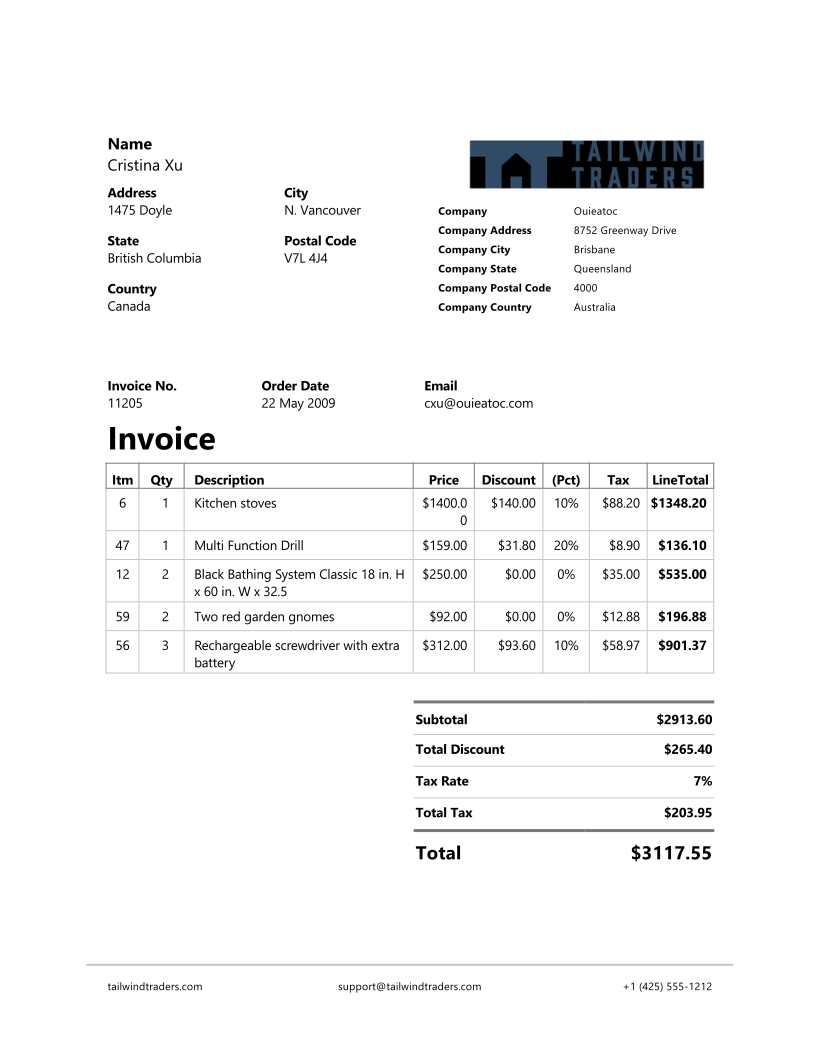
This code loads a few external files from an Azure storage account that's used for demo purposes. The files are various invoices, and they're read into a data frame.
from pyspark.sql.functions import udf
from pyspark.sql.types import StringType


def blob_to_url(blob):
    [prefix, postfix] = blob.split("@")
    container = prefix.split("/")[-1]
    split_postfix = postfix.split("/")
    account = split_postfix[0]
    filepath = "/".join(split_postfix[1:])
    return "https://{}/{}/{}".format(account, container, filepath)


df2 = (
    spark.read.format("binaryFile")
    .load("wasbs://publicwasb@mmlspark.blob.core.windows.net/form_subset/*")
    .select("path")
    .limit(10)
    .select(udf(blob_to_url, StringType())("path").alias("url"))
    .cache()
)

display(df2)
3 - Apply form recognition
This code loads the AnalyzeInvoices transformer and passes a reference to the data frame containing the invoices. It calls the pre-built invoice model of Azure Forms Analyzer.
from synapse.ml.services.form import AnalyzeInvoices

analyzed_df = (
    AnalyzeInvoices()
    .setSubscriptionKey(cognitive_key)
    .setLocation(cognitive_location)
    .setImageUrlCol("url")
    .setOutputCol("invoices")
    .setErrorCol("errors")
    .setConcurrency(5)
    .transform(df2)
    .cache()
)

display(analyzed_df)
4 - Simplify form recognition output
This code uses the FormOntologyLearner, a transformer that analyzes the output of Form Recognizer transformers (for Azure AI Document Intelligence) and infers a tabular data structure. The output of AnalyzeInvoices is dynamic and varies based on the features detected in your content.
FormOntologyLearner extends the utility of the AnalyzeInvoices transformer by looking for patterns that can be used to create a tabular data structure. Organizing the output into multiple columns and rows makes for simpler downstream analysis.
from synapse.ml.services.form import FormOntologyLearner

organized_df = (
    FormOntologyLearner()
    .setInputCol("invoices")
    .setOutputCol("extracted")
    .fit(analyzed_df)
    .transform(analyzed_df)
    .select("url", "extracted.*")
    .cache()
)

display(organized_df)
With our nice tabular dataframe, we can flatten the nested tables found in the forms with some SparkSQL
from pyspark.sql.functions import explode, col

itemized_df = (
    organized_df.select("*", explode(col("Items")).alias("Item"))
    .drop("Items")
    .select("Item.*", "*")
    .drop("Item")
)

display(itemized_df)
5 - Add translations
This code loads Translate, a transformer that calls the Azure AI Translator service in Azure AI services. The original text, which is in English in the "Description" column, is machine-translated into various languages. All of the output is consolidated into "output.translations" array.
from synapse.ml.services.translate import Translate

translated_df = (
    Translate()
    .setSubscriptionKey(translator_key)
    .setLocation(translator_location)
    .setTextCol("Description")
    .setErrorCol("TranslationError")
    .setOutputCol("output")
    .setToLanguage(["zh-Hans", "fr", "ru", "cy"])
    .setConcurrency(5)
    .transform(itemized_df)
    .withColumn("Translations", col("output.translations")[0])
    .drop("output", "TranslationError")
    .cache()
)

display(translated_df)
6 - Translate products to emojis with OpenAI 🤯
from synapse.ml.services.openai import OpenAIPrompt
from pyspark.sql.functions import trim, split

emoji_template = """
  Your job is to translate item names into emoji. Do not add anything but the emoji and end the translation with a comma

  Two Ducks: 🦆🦆,
  Light Bulb: 💡,
  Three Peaches: 🍑🍑🍑,
  Two kitchen stoves: ♨️♨️,
  A red car: 🚗,
  A person and a cat: 🧍🐈,
  A {Description}: """

prompter = (
    OpenAIPrompt()
    .setSubscriptionKey(openai_key)
    .setDeploymentName(openai_deployment_name)
    .setUrl(openai_url)
    .setMaxCompletionTokens(500)
    .setReasoningEffort("low")
    .setPromptTemplate(emoji_template)
    .setErrorCol("error")
    .setOutputCol("Emoji")
)

emoji_df = (
    prompter.transform(translated_df)
    .withColumn("Emoji", trim(split(col("Emoji"), ",").getItem(0)))
    .drop("error", "prompt")
    .cache()
)
display(emoji_df.select("Description", "Emoji"))
7 - Infer vendor address continent with OpenAI
continent_template = """
Which continent does the following address belong to?

Pick one value from Europe, Australia, North America, South America, Asia, Africa, Antarctica.

Dont respond with anything but one of the above. If you don't know the answer or cannot figure it out from the text, return None. End your answer with a comma.

Address: "6693 Ryan Rd, North Whales",
Continent: Europe,
Address: "6693 Ryan Rd",
Continent: None,
Address: "{VendorAddress}",
Continent:"""

continent_df = (
    prompter.setOutputCol("Continent")
    .setPromptTemplate(continent_template)
    .transform(emoji_df)
    .withColumn("Continent", trim(split(col("Continent"), ",").getItem(0)))
    .drop("error", "prompt")
    .cache()
)
display(continent_df.select("VendorAddress", "Continent"))
8 - Create an Azure AI Search Index for the Forms
from synapse.ml.services import *
from pyspark.sql.functions import monotonically_increasing_id, lit

(
    continent_df.withColumn("DocID", monotonically_increasing_id().cast("string"))
    .withColumn("SearchAction", lit("upload"))
    .writeToAzureSearch(
        subscriptionKey=search_key,
        actionCol="SearchAction",
        serviceName=search_service,
        indexName=search_index,
        keyCol="DocID",
    )
)
9 - Try out a search query
import requests

search_url = "https://{}.search.windows.net/indexes/{}/docs/search?api-version=2026-04-01".format(
    search_service, search_index
)
requests.post(
    search_url, json={"search": "door"}, headers={"api-key": search_key}
).json()
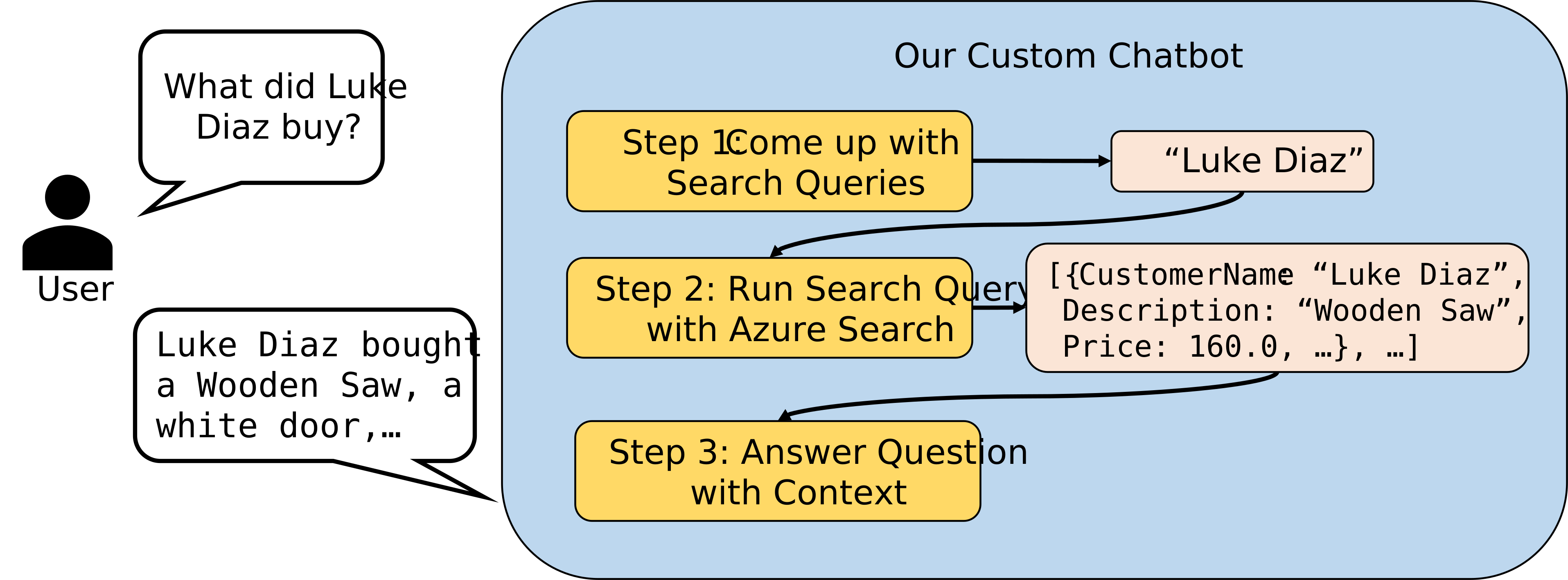
10 - Build a chatbot that can use Azure AI Search as a tool 🧠🔧
import json
from openai import OpenAI

openai_client = OpenAI(
    api_key=openai_key,
    base_url=f"{openai_url.rstrip('/')}/openai/v1/",
)

chat_context_prompt = f"""
You are a chatbot designed to answer questions with the help of a search engine that has the following information:

{continent_df.columns}

If you dont know the answer to a question say "I dont know". Do not lie or hallucinate information. Be brief. If you need to use the search engine to solve the please output a json in the form of {{"query": "example_query"}}
"""


def search_query_prompt(question):
    return f"""
Given the search engine above, what would you search for to answer the following question?

Question: "{question}"

Please output a json in the form of {{"query": "example_query"}}
"""


def search_result_prompt(query):
    search_results = requests.post(
        search_url, json={"search": query}, headers={"api-key": search_key}
    ).json()
    return f"""

You previously ran a search for "{query}" which returned the following results:

{search_results}

You should use the results to help you answer questions. If you dont know the answer to a question say "I dont know". Do not lie or hallucinate information. Be Brief and mention which query you used to solve the problem.
"""


def prompt_gpt(messages, json_mode=False):
    request_options = {}
    if json_mode:
        request_options["response_format"] = {"type": "json_object"}

    response = openai_client.chat.completions.create(
        model=openai_deployment_name,
        messages=messages,
        max_completion_tokens=1024,
        reasoning_effort="low",
        **request_options,
    )
    return response.choices[0].message.content


def custom_chatbot(question):
    query = json.loads(
        prompt_gpt(
            [
                {"role": "system", "content": chat_context_prompt},
                {"role": "user", "content": search_query_prompt(question)},
            ],
            json_mode=True,
        )
    )["query"]

    return prompt_gpt(
        [
            {"role": "system", "content": chat_context_prompt},
            {"role": "system", "content": search_result_prompt(query)},
            {"role": "user", "content": question},
        ]
    )
11 - Asking our chatbot a question
custom_chatbot("What did Luke Diaz buy?")
12 - A quick double check
display(
    continent_df.where(col("CustomerName") == "Luke Diaz")
    .select("Description")
    .distinct()
)